
Brightness Scheduler
Windows, C# / WPF / .NET 10 · AI-assisted (Claude) · GitHub: BrightnessScheduler
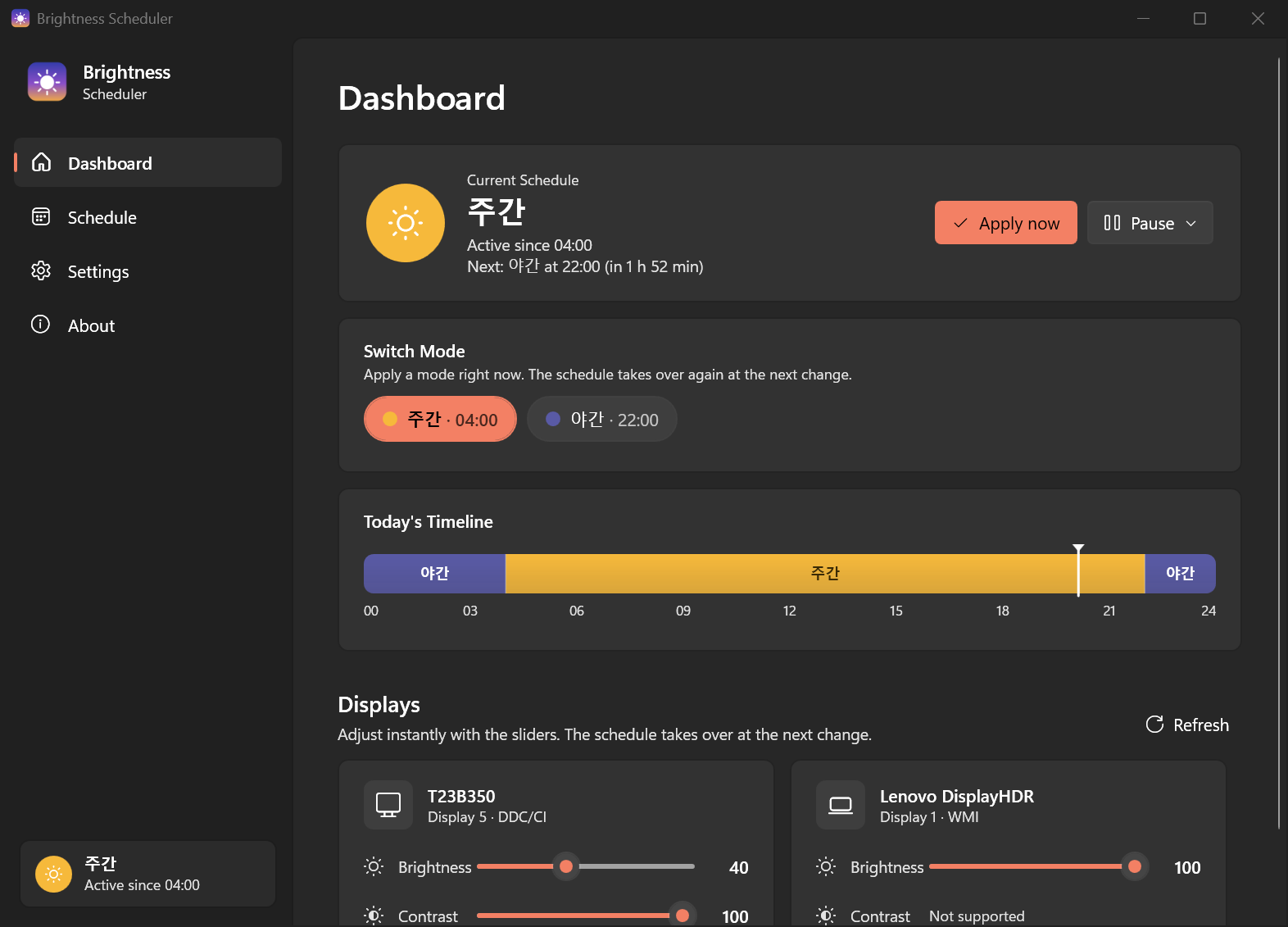
Brightness Scheduler is a tray app that changes the brightness and contrast of your laptop screen and external monitors on a schedule. You might use 100 % during the day and 30 % at night. You set the times once, and the app switches every display for you.
Why it exists
Looking at a screen at full daytime brightness late at night is tiring, and adjusting it means using the laptop's brightness keys and then each monitor's on-screen buttons separately. Windows Night Light only changes color temperature and doesn't touch an external monitor's brightness or contrast. The tools that do handle this were either heavy or couldn't put a laptop panel and external monitors on the same schedule.
So the goal was one small exe with no install: a tray app that matches every screen's brightness and contrast to a timetable.
What it does
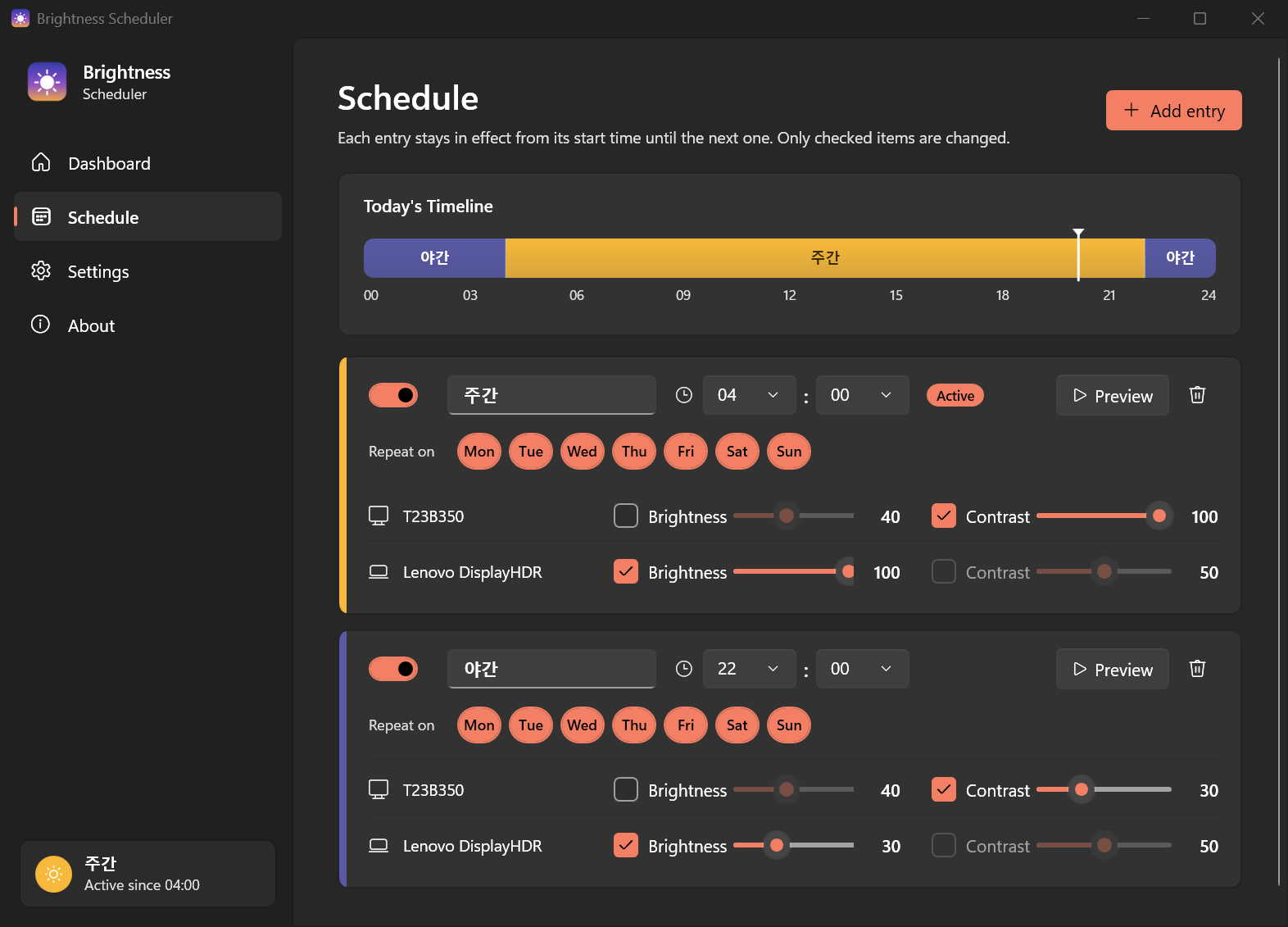
- Time-based schedule. Add entries like Day at 07:00, Evening at 20:00, and Night at 23:00. Each entry stays in effect until the next one starts, including across midnight.
- Per display, per property. Brightness and contrast can be set separately for each display. Anything left unchecked isn't touched.
- Laptop panels and external monitors. Built-in panels go through WMI. External monitors go through DDC/CI (brightness
VCP 0x10, contrastVCP 0x12). - Repeat on specific days, so weekends can follow a different schedule.
- Mode switcher. Jump to any entry right now, like Night in the middle of the day, from the dashboard or tray. The schedule takes over again at the next change.
- Windows Night Light on/off and strength per entry.
- Smooth transitions that can fade over up to 10 minutes.
- Re-applies after sleep, unlock, and monitor hot-plug, because some monitors forget their settings when they power cycle.
- Pause, a timeline for today, light and dark themes, and Korean and English UI.
How it's built
It's a WPF app on .NET 10 using MVVM. The code is split into three layers:
Services/: hardware access (MonitorServicefor DDC/CI and WMI), scheduling (SchedulerServicefor the active entry, transitions, and wake/unlock/hot-plug handling), andScheduleMath, which keeps the schedule calculations as pure functions.ViewModels/: MVVM view models.Views/: the window, tray icon, and styles.
Settings live in a plain JSON file at %APPDATA%\BrightnessScheduler\settings.json. If a settings.json sits next to the exe, the app uses that one instead, so it can run from a USB stick.
Releases
Pushing a version tag starts a GitHub Actions build that produces two exes and attaches them to a GitHub release. One is a self-contained single file (about 65 MB) that needs nothing else installed. The other is much smaller but needs the .NET 10 Desktop Runtime. Each release includes a SHA256SUMS.txt. Code signing goes through the free SignPath Foundation program.
Requirements
Windows 10 or 11 (x64). External monitors need DDC/CI turned on in their on-screen menu. Some docks, KVMs, and USB-C/DisplayLink adapters don't pass DDC/CI through. Download from Releases.
Apache License 2.0.